Billing, plans and seats
The Start, Tým, Kancelář and Enterprise plans, the 14-day trial, changing plans, invoices, the payment card, buying extra seats and AI extraction packs.
Updated October 27, 2026
On this page
DOXIO is paid monthly or yearly according to the plan you choose. The first 14 days are a free trial. The subscription is managed by an owner or admin of the organization in Settings → Billing.
Plans#
| Start | Tým | Kancelář | Enterprise | |
|---|---|---|---|---|
| Monthly price | CZK 590 | CZK 1,490 | CZK 2,990 | from CZK 6,900 |
| Yearly price | CZK 5,900 | CZK 14,900 | CZK 29,900 | from CZK 69,000 |
| Users included | 2 | 5 | 15 | 30 |
| Extra user (monthly) | CZK 190 | CZK 190 | CZK 150 | CZK 150 |
| Active client workspaces | 10 | 75 | 300 | unlimited |
| Storage | 10 GB | 50 GB | 200 GB | 1 TB |
- Monthly price
- Start
- CZK 590
- Tým
- CZK 1,490
- Kancelář
- CZK 2,990
- Enterprise
- from CZK 6,900
- Yearly price
- Start
- CZK 5,900
- Tým
- CZK 14,900
- Kancelář
- CZK 29,900
- Enterprise
- from CZK 69,000
- Users included
- Start
- 2
- Tým
- 5
- Kancelář
- 15
- Enterprise
- 30
- Extra user (monthly)
- Start
- CZK 190
- Tým
- CZK 190
- Kancelář
- CZK 150
- Enterprise
- CZK 150
- Active client workspaces
- Start
- 10
- Tým
- 75
- Kancelář
- 300
- Enterprise
- unlimited
- Storage
- Start
- 10 GB
- Tým
- 50 GB
- Kancelář
- 200 GB
- Enterprise
- 1 TB
Paying yearly costs the same as 10 months, so 2 months are free. Only active client workspaces count towards the limit; archived ones don't.
What every plan includes#
- unlimited signed and shared documents,
- multi-signer signing, document templates with variables, folders, company lookup in ARES,
- client workspaces and the client portal (within the plan's limit),
- personal two-factor authentication and passkeys.
What higher plans add#
| Feature | From plan |
|---|---|
| Logo and colours in the portal, e-mails and signing pages; hide the “powered by DOXIO” line | Tým |
| A separate signature certificate with your brand | Tým |
| Bulk sending one document to many recipients | Tým |
| Accounting exports for Pohoda, Money, ISDOC and CSV | Tým |
| Read-only REST API | Tým |
| Full REST API and webhooks | Kancelář |
| Direct connection to ABRA Flexi | Kancelář |
| Enforcing two-factor authentication for every member | Kancelář |
| Signing mandate and automatic signature on behalf of the organization | Kancelář |
| Contractual SLA and custom terms | Enterprise |
- Feature
- Logo and colours in the portal, e-mails and signing pages; hide the “powered by DOXIO” line
- From plan
- Tým
- Feature
- A separate signature certificate with your brand
- From plan
- Tým
- Feature
- Bulk sending one document to many recipients
- From plan
- Tým
- Feature
- Accounting exports for Pohoda, Money, ISDOC and CSV
- From plan
- Tým
- Feature
- Read-only REST API
- From plan
- Tým
- Feature
- Full REST API and webhooks
- From plan
- Kancelář
- From plan
- Kancelář
- Feature
- Enforcing two-factor authentication for every member
- From plan
- Kancelář
- Feature
- Signing mandate and automatic signature on behalf of the organization
- From plan
- Kancelář
- Feature
- Contractual SLA and custom terms
- From plan
- Enterprise
Free trial#
- Open the plan picker: in Settings → Billing, click Choose a plan.
- Choose Monthly or Yearly and click Start 14-day trial on a plan.
- In Billing country, select your country. EU businesses can fill in VAT ID (optional) for reverse-charge tax.
- Enter your payment card and confirm.
Your card is saved now but not charged until the trial ends. You can cancel anytime before then. The end date is shown in Settings → Billing under Trial until. During the trial you have full access according to the chosen plan.
Subscription overview#
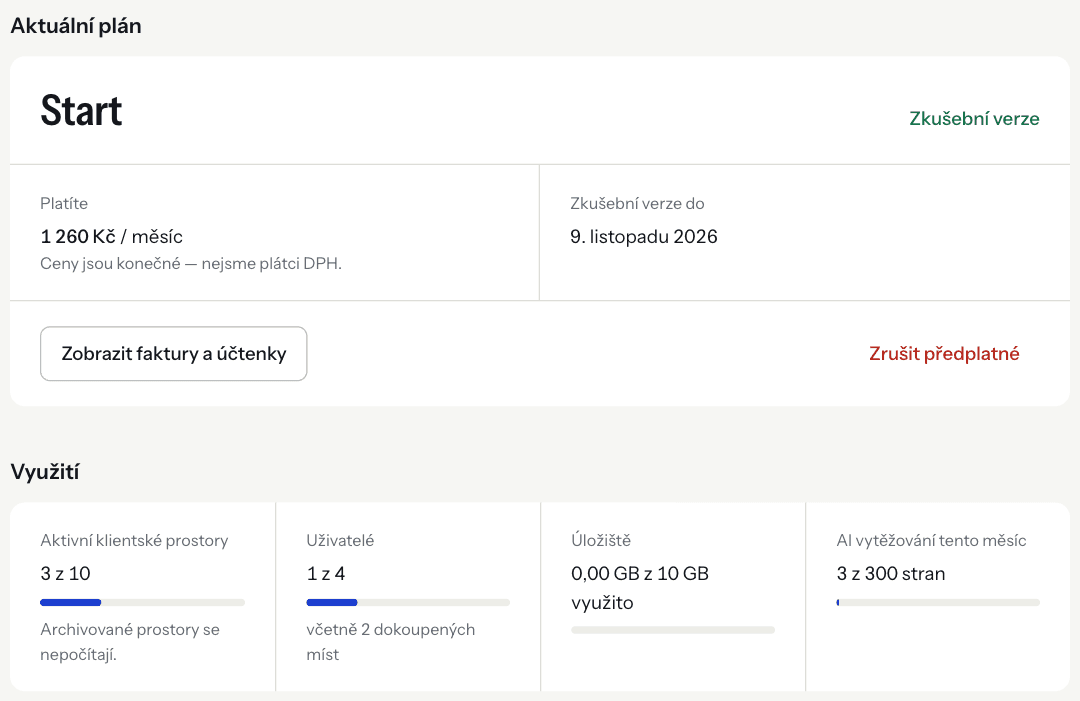
In Settings → Billing you see your current plan and its status, what you pay (including extra seats and the AI pack) and the next renewal date. Usage shows active client workspaces, users, storage and AI extraction this month.
How to change your plan#
- In Settings → Billing, scroll to Change plan.
- Switch between Monthly and Yearly.
- Click Switch to … on the plan you want.
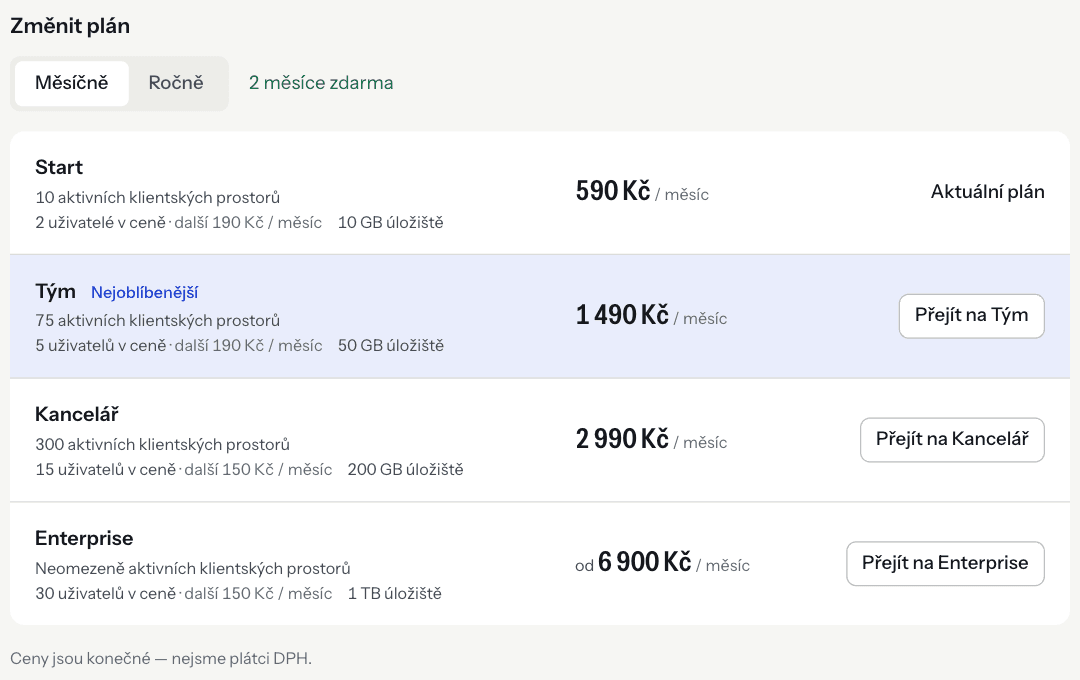
The new plan applies in a moment, and the price difference is prorated for the rest of the period. You move from monthly to yearly billing on your current plan the same way: switch to Yearly and click Switch to … on your plan. Extra seats and the AI pack move with the plan.
If the new plan has lower limits than you use now, DOXIO shows what you are over and you confirm with Switch to … anyway. Nothing is deleted and nobody loses access, but until you fit the limits you can't create new workspaces, invite more members or upload beyond the storage limit.
Seats for users#
Every plan includes a number of users (see Plans). Every member of the organization, the owner included, takes one seat. You can add more seats to your subscription.
- In Settings → Billing, find Extra users.
- In Extra seats, enter how many seats you want on top. Next to it you see the total seats, the number of members and the price.
- Click Save seat count.
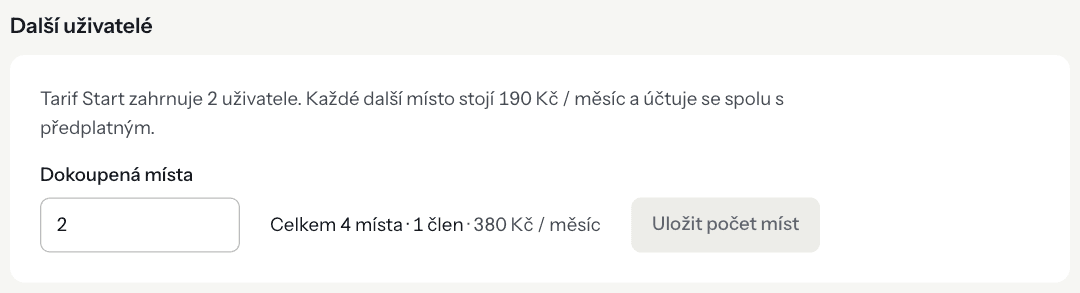
Seats are billed with your subscription on the same interval (monthly or yearly), prorated for the rest of the period. The new limit applies in a moment. When every seat is taken, you can also buy one seat right on the Team page.
You can lower the number of seats too, but not below your current number of members — remove members in Settings → Team first.
AI document extraction#
AI extraction is an add-on: AI reads invoices and receipts and pre-fills the accounting data. The pack sets how many pages a month you can extract and is billed with your subscription. Buying or upgrading is billed right away; during the trial the limit is at most 50 pages.
| Pack | Monthly price | Yearly price |
|---|---|---|
| 300 pages a month | CZK 290 | CZK 2,900 |
| 1,500 pages a month | CZK 990 | CZK 9,900 |
| 5,000 pages a month | CZK 2,490 | CZK 24,900 |
- Pack
- 300 pages a month
- Monthly price
- CZK 290
- Yearly price
- CZK 2,900
- Pack
- 1,500 pages a month
- Monthly price
- CZK 990
- Yearly price
- CZK 9,900
- Pack
- 5,000 pages a month
- Monthly price
- CZK 2,490
- Yearly price
- CZK 24,900
Pick a pack under AI document extraction and confirm with Buy pack (or Change pack / Cancel pack). Once the pages are used up, extraction stops until the end of the month — nothing is charged extra. Without a pack the extraction module can't be switched on.
Invoices and payment card#
- Invoices: View invoices and receipts opens the billing portal, where you can download all your invoices and receipts.
- Card: under Payment method, click Update card and enter the new card.
Cancelling the subscription#
- In Settings → Billing, click Cancel subscription.
- Confirm in the dialog.
Your plan stays active until the end of the current billing period. Until then you can undo the cancellation with Resume subscription. After the subscription ends, your data stays available read-only; to keep working, choose a plan and start a new subscription.
Troubleshooting#
“Your payment didn't go through” The payment could not be collected. Uploads are paused until it's resolved. Under Payment method, click Update card — access is restored once the payment succeeds.
“Add a payment card first — a trial without a card can't be switched to another plan.” Add a card under Payment method and try the change again.
“Your organization has … members, but the limit would be …” You are trying to lower the seats below the number of members. Remove members first.
The app shows “You're using more than your plan allows”. After moving to a lower plan you are over a limit. Archive workspaces you don't need, remove members, free up space, or move to a higher plan.